Openshift in a Disconnected world
21 September 2021
Juan Manuel Parrilla
Principal Software Engineer, Red Hat
Mario Vazquez Cebrian
Principal Software Engineer, Red Hat
Juan Manuel Parrilla
Principal Software Engineer, Red Hat
Mario Vazquez Cebrian
Principal Software Engineer, Red Hat

Be sure you check the documentation before to start dealing with a real one!
2- The Helper node - Kernel Parameters - Additional Services: DHCP, DNS, etc... - Container Image Sync - Download RHCOS Resources - Networking - The install-config file - CatalogSources and ICSPs
Basically all pre-requisites comes from the helper node. We call a helper node to that one which gives the basic services to that environment, like DNS, DHCP, HTTPD, etc... So let's create a list of services necessary to make this work:
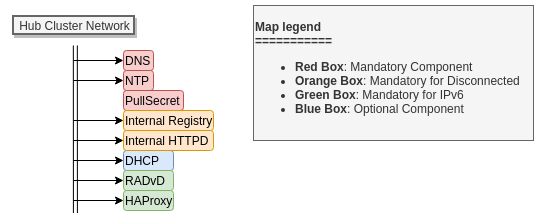
We can classify them as you see in the diagram:
Dnsmasq software because it can hold both configs.ChronyHTTPDThese are the basic components on the Helper Node.
7Another important things to make sure the services on the Helper Node works fine, we need to add these config to the Kernel:
# Enable IPv6 Forwading for all interfaces
net.ipv6.conf.all.forwarding=1

# Accept RA's even if forwarding is enabled
net.ipv6.conf.all.accept_ra=2

# Reverse Path not validated
net.ipv4.conf.all.rp_filter=0

# Disable IPv6 Loopback config
net.ipv6.conf.lo.disable_ipv6=0
Firstly we need a couple of mandatory services, they will be DNS and NTP.
chrony.confTo start the image synchronization for the OCP installation it's quite easy, we will just need to :
host_fqdn=$(hostname --long)
path=/opt/registry
cert_c="US"            # Country Name (C, 2 letter code)
cert_s="California"    # Certificate State (S)
cert_l="SOL"           # Certificate Locality (L)
cert_o="ACME Corp"     # Certificate Organization (O)
cert_ou="IT"           # Certificate Organizational Unit (OU)
cert_cn="${host_fqdn}" # Certificate Common Name (CN)
mkdir -p ${path}/{auth,certs,data}

openssl req -newkey rsa:4096 -nodes -sha256 -keyout ${path}/certs/domain.key -x509 -days 3650 -out ${path}/certs/domain.crt -addext "subjectAltName = DNS:${host_fqdn}"
-subj "/C=${cert_c}/ST=${cert_s}/L=${cert_l}/O=${cert_o}/OU=${cert_ou}/CN=${cert_cn}"

sudo cp ${path}/certs/domain.crt /etc/pki/ca-trust/source/anchors/
sudo update-ca-trust extract
htpasswd -bBc ${path}/auth/htpasswd dummy dummy
podman create \
    --name ocpdiscon-registry \
    -p 5000:5000 \
    -e "REGISTRY_AUTH=htpasswd" \
    -e "REGISTRY_AUTH_HTPASSWD_REALM=Registry" \
    -e "REGISTRY_HTTP_SECRET=ALongRandomSecretForRegistry" \
    -e "REGISTRY_AUTH_HTPASSWD_PATH=/auth/htpasswd" \
    -e "REGISTRY_HTTP_TLS_CERTIFICATE=/certs/domain.crt" \
    -e "REGISTRY_HTTP_TLS_KEY=/certs/domain.key" \
    -e "REGISTRY_COMPATIBILITY_SCHEMA1_ENABLED=true" \
    -v ${path}/data:/var/lib/registry:z \
    -v ${path}/auth:/auth:z \
    -v ${path}/certs:/certs:z \
    -v ${path}/conf/config.yml:/etc/docker/registry/config.yml:z \
> Apart from the desired configuration for your registry ensure the compatibility schema1 it's enabled
# Variables
export PULL_SECRET_JSON=/root/pull_secret.json
export LOCAL_REGISTRY=$(hostname):5000
export LOCAL_REPOSITORY=ocp4
export OCP_RELEASE=4.8.2-x86_64
export OCP_REGISTRY=quay.io/openshift-release-dev/ocp-release
export HTTP_PROXY=proxy.acme.lab:3128
export HTTPS_PROXY=proxy.acme.lab:3128
export NO_PROXY=bastion1.acme.lab
    oc adm -a ${PULL_SECRET_JSON} release mirror \
        --from=${OCP_REGISTRY}:${OCP_RELEASE} \
        --to=${LOCAL_REGISTRY}/${LOCAL_REPOSITORY} \
        --to-release-image=${LOCAL_REGISTRY}/${LOCAL_REPOSITORY}:${OCP_RELEASE}
Once synced the container images, we need to download the RHCOS images for the OCP deployment, to do that we have a script to help you that extracts the information from the Openshift installer:
    echo "----> Downloading IPI Installer"
    oc adm --registry-config ${PULL_SECRET_JSON} release extract \
        --command=openshift-baremetal-install \
        --from=${OCP_REGISTRY}:${OCP_RELEASE} \
        --to .
This will extract the IPI installer binary from the desired release you wanna install.
Ensure you move to the OS path and change the execution permissions flag on the binary.
For that we use the Installer to extract the proper URLs for the selected release (which are hardcoded), this is a sample about how to extract them but you can find all needed resources in the assets/src/release-sync-full.sh script
# RHCOS Version
openshift-baremetal-install coreos print-stream-json \
| jq -r '.["architectures"]["x86_64"]["artifacts"]["metal"]["release"]'

# RHCOS ISO URI
openshift-baremetal-install coreos print-stream-json \
| jq -r '.["architectures"]["x86_64"]["artifacts"]["metal"]["formats"]["iso"]["disk"]["location"]'
These ones and some more are necessary to install our OCP Hub Cluster, the script will help you to identify which ones are necessary and where to place them.
14
Summarizing you will need these elements to place them into the install-config.yaml file:
In the install-config.yaml format will be something like:
bootstrapOSImage: http://[2100:52:1302::1]/rhcos-qemu.x86_64.qcow2.gz?sha256=17868a1963ae2eae25...
clusterOSImage: http://[2100:52:1302::1]/rhcos-openstack.x86_64.qcow2.gz?sha256=6ab5c6413f27527...
The IPv6 with the image name is our internal server hosting the images
The sha256=... is the hash referenced on the binary
The networking part I think it's a bit tricky, because you need to know how IPv6 works in a generic network with the RA/NA/ND and so on, once you know that, you need apply it to your network checking with your network admin if some capabilities are disabled or not, let's get into it.
Important points to discuss:
AdvOnLink on and AdvRouterAddr on are mandatory options if not, NM will get confusedndptool mon -i 'baremetal.154' -t ra
ndptool
If you are deploying Openshift this is one of the main pieces let's check the relevant fields inside
networking:
  networkType: OVNKubernetes
  machineCIDR: 2100:52:1302::/64
  clusterNetwork:
  - cidr: fd01::/48
    hostPrefix: 64
  serviceNetwork:
  - fd02::/112
metadata:
  name: mgmt-hub
compute:
- name: worker
  replicas: 0
controlPlane:
  name: master
  replicas: 3
  platform:
    baremetal: {}
platform:
  baremetal:
    provisioningNetworkInterface: enp3s0f1
    provisioningNetworkCIDR: 2100:52:1307::/64
    provisioningBridge: "prov.157"
    externalBridge: "baremetal.152"
    bootstrapProvisioningIP: 2100:52:1307::2
    bootstrapOSImage: http://[2100:52:1302::1]/4.8.0-x86_64/rhcos-48.84.202106091622-0-qemu.x86_64.qcow2.gz?sha256=17868a1963ae2eae25fb16cb85871e08758066f5c5ee87276201c377cf25e418
    clusterOSImage: http://[2100:52:1302::1]/4.8.0-x86_64/rhcos-48.84.202106091622-0-openstack.x86_64.qcow2.gz?sha256=6ab5c6413f275277ea90f7dfc66424ef14993941ba3a9f3a43955ab268e7d76d
    apiVIP: 2100:52:1302::3
    ingressVIP: 2100:52:1302::2
    hosts:
      - name: openshift-master-0
        role: master
        bmc:
          address:  ipmi://[2100:52:1300::81]
          username: teseo
          password: minos
        bootMACAddress: 18:DB:B1:C8:59:A3
        hardwareProfile: default
imageContentSources:
- mirrors:
  - bm-cluster-1-hyper.e2e.bos.redhat.com:5000/ocp4
  source: quay.io/openshift-release-dev/ocp-release
additionalTrustBundle: |
  -----BEGIN CERTIFICATE-----
  MIIGJzCCBA+gAwIBAgIUcuRdl0sEsCZMPWuE44snY/MLgcowDQYJKoZIhvcNAQEL
  BQAwgYgxCzAJBgNVBAYTAlVTMRYwFAYDVQQIDA1NYXNzYWNodXNldHRzMREwDwYD
pullSecret: |
  {"auths":{"bm-cluster-1-hyper.e2e.bos.redhat.com:5000":{"auth":"a25pOmtuaQ==","email":"john.doe@redhat.com"}}}
sshKey: |
  ssh-rsa AAAAB3NzaC1yc2EAAACFGjqegPtQVtK1rH38ODIXRwCQlmCbClFQCMIR6nUn6wWCv5kcC9An7c9jg5Zjwu9g/umM0hQs1HX4nFGhg6AXyuD6jjbmrugKEO1NTjG9pKB+G6OSbbwrbydyd1ZonbrhTvN1rFSrKA+nKX2bseZDZh4ikBU4CPMpEG/F1AqBMlIyk= kni@bm-cluster-1-hyper.e2e.bos.redhat.com
A CatalogSource is a K8s object that allow the OLM (Operator Lifecycle Manager) to consume PackageManifests included on that source.

  name: custom-community-operator-catalog-v4-8
  namespace: openshift-marketplace
spec:
  sourceType: grpc
  image: bastion.redhat.lab.com:5000/olm-index/community-operator-index:v4.8
  displayName: BM Lab - Community Operator - v4.8
  publisher: BM Lab Registry
  updateStrategy:
    registryPoll:
      interval: 30m
The CatalogSource points to an index image which contains a serie of objects that K8s parse as PackageManifests
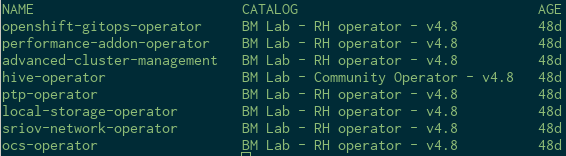

gprcurl to check the content:
You can use opm and tool to create you own indexImages and then push it to your internal registry to be consumed for your own CatalogSources.
Stands for ImageContentSourcePolicy and the concept behind this object it's easy to understand
/etc/containers/registries.conf fileICSP it's a K8s object that create these entries on the OCP nodes.
The controller that manage this object is the MachineConfig Operator, so make sure you don't have it in degraded state
oc get mcp
This is how looks like an ICSP
apiVersion: operator.openshift.io/v1alpha1
kind: ImageContentSourcePolicy
metadata:
  name: ztp-disconnected
spec:
  repositoryDigestMirrors:
  - mirrors:
    - bm-cluster-1-hyper.e2e.bos.redhat.com:5000/rhacm2
    source: quay.io/acm-d
And the result on the /etc/containers/registries.conf file
unqualified-search-registries = ["registry.access.redhat.com", "docker.io"]
[[registry]]
  prefix = ""
  location = "quay.io/acm-d"
  mirror-by-digest-only = true
  [[registry.mirror]]
    location = "bm-cluster-1-hyper.e2e.bos.redhat.com:5000/rhacm2"
But Warning, you need to know these things:
registries.conf file the MCO will enter on degraded statemirror-by-digest-only = true will be exposed on the API on 4.9 and you will be able the modify this directly on the ICSP