Hands on: Prow
Kubernetes Native CI/CD
25 January 2020
Juan Manuel Parrilla
Senior Software Engineer, Red Hat
Juan Manuel Parrilla
Senior Software Engineer, Red Hat


/lgtm or /retesttest-pod namespace to trigger the pod jobs and the default namespace for Prow Control PlaneNAME READY STATUS RESTARTS AGE deck-f958755bc-skq64 1/1 Running 0 2d2h deck-f958755bc-v5568 1/1 Running 0 2d2h hook-57d5467cbc-6ndvg 1/1 Running 0 10d hook-57d5467cbc-k22fm 1/1 Running 0 10d horologium-79965ffb5-c29nt 1/1 Running 0 10d plank-79646b78fb-mn796 1/1 Running 0 10d sinker-796f7df8cb-tdj5b 1/1 Running 0 10d statusreconciler-56b668448f-bm7f9 1/1 Running 0 10d tide-6d66ddcb4c-gms2t 1/1 Running 0 10d
NAME                 TYPE        CLUSTER-IP       EXTERNAL-IP   PORT(S)          AGE
service/deck         NodePort    10.104.115.56    <none>        80:30000/TCP     10d
service/hook         NodePort    10.105.150.158   <none>        8888:30300/TCP   10d
service/kubernetes   ClusterIP   10.96.0.1        <none>        443/TCP          10d
service/tide         NodePort    10.109.88.186    <none>        80:30090/TCP     10d
Github /retest comment > Hook > Tide > Trigger jobs



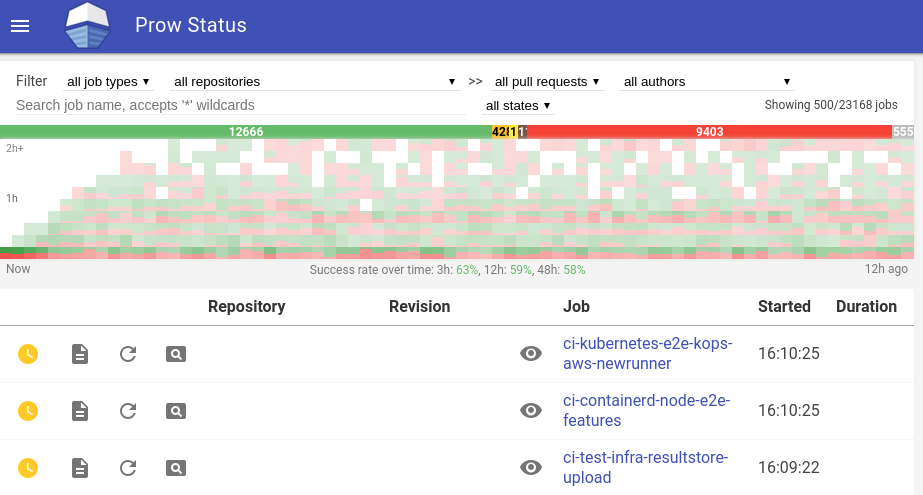
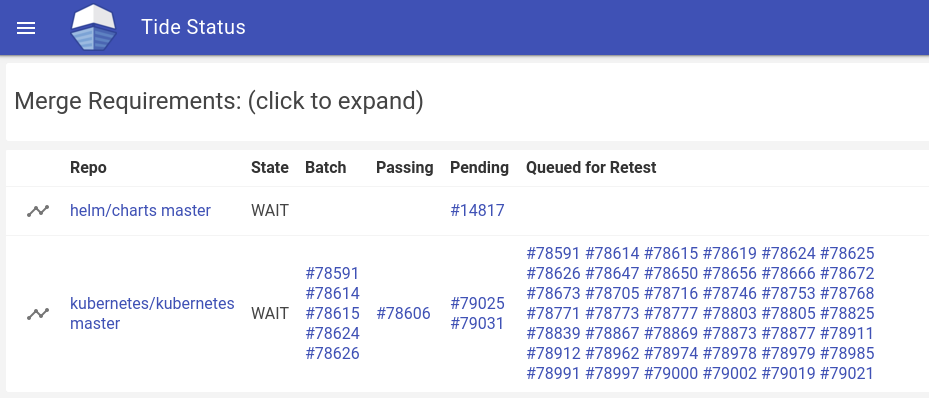
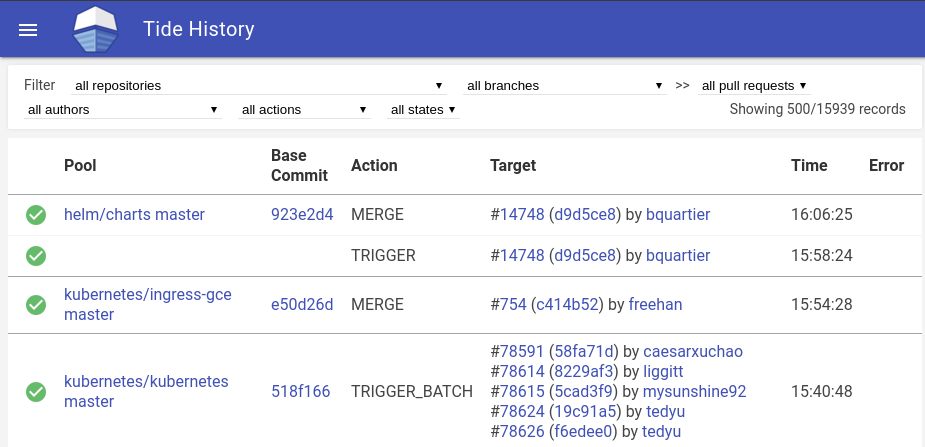
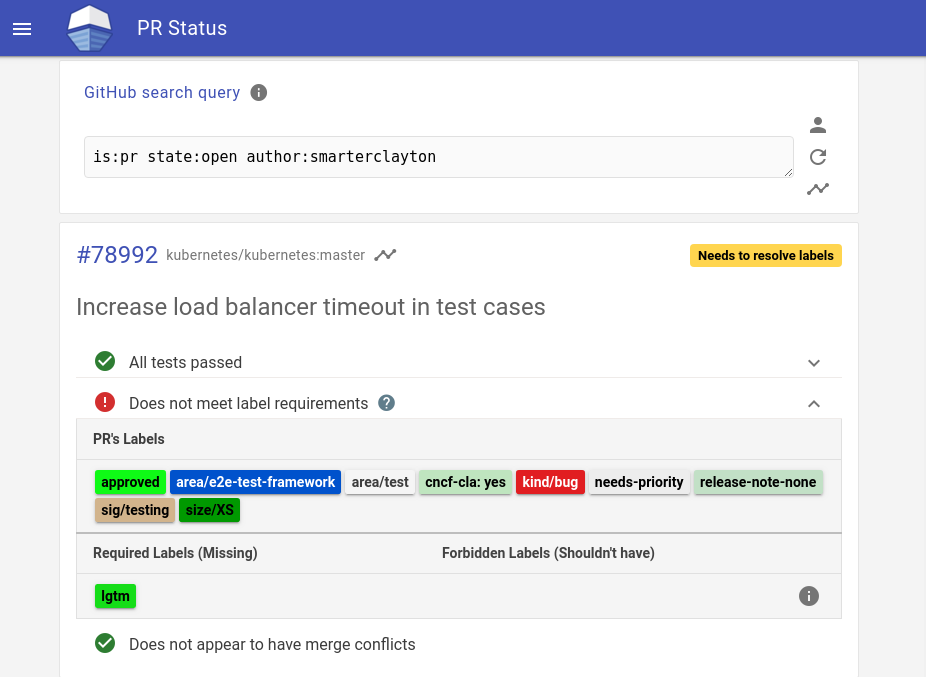
Both are very simple but useful components
merge, squash and rebaseThose are the supported providers:

We have 2 ways to deploy Prow:
We recommend to use Tackle because in some minutes you will have it Prow working, you will need to follow this procedure and some requirements:
This is a Sample Installation but without SSL (T_T)
20Or Manual way:
With our new fresh K8s cluster we will start working to deploy Prow:
We will summarize all the nesessary steps to make it work (all explained in depth on the previous link):
test-pods NS and apply the prow/cluster/starter.yaml manifestDepending on How did you configure your K8s instances you will access to your Prow instances in a way or other:
NAME                 TYPE        CLUSTER-IP       EXTERNAL-IP   PORT(S)          AGE
service/deck         NodePort    10.104.115.56    <none>        80:30000/TCP     10d
service/hook         NodePort    10.105.150.158   <none>        8888:30300/TCP   10d
service/kubernetes   ClusterIP   10.96.0.1        <none>        443/TCP          10d
service/tide         NodePort    10.109.88.186    <none>        80:30090/TCP     10d

To deploy SSL in our cluster we will need some additional requirements
NOTE: depending on your decission you could go with Let's Encrypt or SelfSigned cert but if you're using a ".dev" domain you should use a real CA to validate your domain.
Check this detailed instructions!!
25You will need to spend some time preparing your config files, here you have our ones that maybe could be useful.
Let's go into the different sections of the ConfigFile. We will not review all the possible options, we will work with our sample file ;)
prowjob_namespace: default
pod_namespace: test-pods
log_level: debug
sinker:
  resync_period: 1m
  max_prowjob_age: 48h
  max_pod_age: 48h
  terminated_pod_ttl: 30m
plank:
  job_url_template: 'https://prow.kerbeross.dev/view/gcs/kerbeross-prow-storage/{{if eq .Spec.Type "presubmit"}}pr-logs/pull{{else if eq .Spec.Type "batch"}}pr-logs/pull{{else}}logs{{end}}{{if .Spec.Refs}}{{if ne .Spec.Refs.Org ""}}/{{.Spec.Refs.Org}}_{{.Spec.Refs.Repo}}{{end}}{{end}}{{if eq .Spec.Type "presubmit"}}/{{with index .Spec.Refs.Pulls 0}}{{.Number}}{{end}}{{else if eq .Spec.Type "batch"}}/batch{{end}}/{{.Spec.Job}}/{{.Status.BuildID}}/'
  job_url_prefix_config:
    '*': "https://prow.kerbeross.dev/view/gcs/"
  pod_pending_timeout: 60m
  default_decoration_configs:
    '*':
      timeout: 2h
      grace_period: 15s
      utility_images:
        clonerefs: "gcr.io/k8s-prow/clonerefs:v20200117-903ce628f"
        initupload: "gcr.io/k8s-prow/initupload:v20200117-903ce628f"
        entrypoint: "gcr.io/k8s-prow/entrypoint:v20200117-903ce628f"
        sidecar: "gcr.io/k8s-prow/sidecar:v20200117-903ce628f"
      gcs_configuration:
        bucket: "kerbeross-prow-storage"
        path_strategy: "explicit"
      gcs_credentials_secret: "gcs"
Note: Careful with the file name, must be service-account.json, the secret name is customizable.
job_url_template: Points to the correct bucket path in order to store the artifactspod_pending_timeout: The time that a pod will wait on Pending until failsdefault_decoration_config: section to extend the pod definitionutility_images: Images that will take care about different tasksgcs_configuration.path_strategy: Explicit means that you set the concrete path with job_url_templatetide: sync_period: 2m merge_method: the-shadowmen/prow-devconf: squash the-shadowmen/kubevirt-tutorial: squash the-shadowmen/kubevirtci: squash queries: - repos: - the-shadowmen/prow-devconf - the-shadowmen/kubevirt-tutorial - the-shadowmen/kubevirtci labels: - lgtm - approved missingLabels: - do-not-merge - do-not-merge/hold
  pr_status_base_urls:
    '*': https://prow.kerbeross.dev/pr
  context_options:
    from-branch-protection: false
    skip-unknown-contexts: true
In Tide section you set the correct context to manages the automerge:
queries field we set the repositories to work with and the criteria to merge the PRs, in this example we need at least the lgtm and approve tags to perform an auto-merge.missingLabels field in order to check that those tags are not there, otherwise Tide will block the auto-merge. pr_status_base_url Is a PR page that shows you the status of your pendings ones. You need to configure this other thing in order to make it work (also have an SSL configured Prow instance) Inside of Deck section and concretelly on spyglass one, we just are telling it that we will have 3 artifacts and are located on those paths
deck:
  spyglass:
    size_limit: 500000000 # 500MB
    viewers:
      "started.json|finished.json":
      - "metadata"
      "build-log.txt":
      - "buildlog"
      "artifacts/junit.*\\.xml":
Also on the config file we used to have the Notifiers and the Jobs, we will talk about those in their own section.
32
Now we need to verify that the ConfigFile and PluginFile is well formed with a Bazel task and then load it as ConfigMap on the default namespace.
test-infra repo location and execute this command:
bazel run //prow/cmd/checkconfig -- \
--plugin-config=$HOME/projects/prow-devconf/prow-config/plugins.yaml \
--config-path=$HOME/projects/prow-devconf/prow-config/config.yaml \
--job-config-path=$HOME/projects/prow-devconf/prow-config/jobsdefault namespace (full path needed):
kubectl create configmap plugins --from-file=$HOME/prow_conf/plugins.yaml --dry-run -o yaml \
| kubectl replace configmap plugins -f - # If the CM already existskubectl create configmap config --from-file=config.yaml=config.yaml --dry-run -o yaml \ | kubectl create configmap config -f - # If the CM doesn't exists kubectl create configmap label-config --from-file=$HOME/prow_conf/labels.yaml -o yaml
Ok, now we have all set to start working with a basic Prow platform, this allows you to manage and automate your Github repository with auto-labelling, approve merges (without auto-merging), etc...
The capabilities of this depend on what plugins did you activate on the PluginsConfig file
there are plenty of them, but some of them needs to add additional ConfigMaps/Sections in ConfigFile/etc...
Let's take a look to plugins...

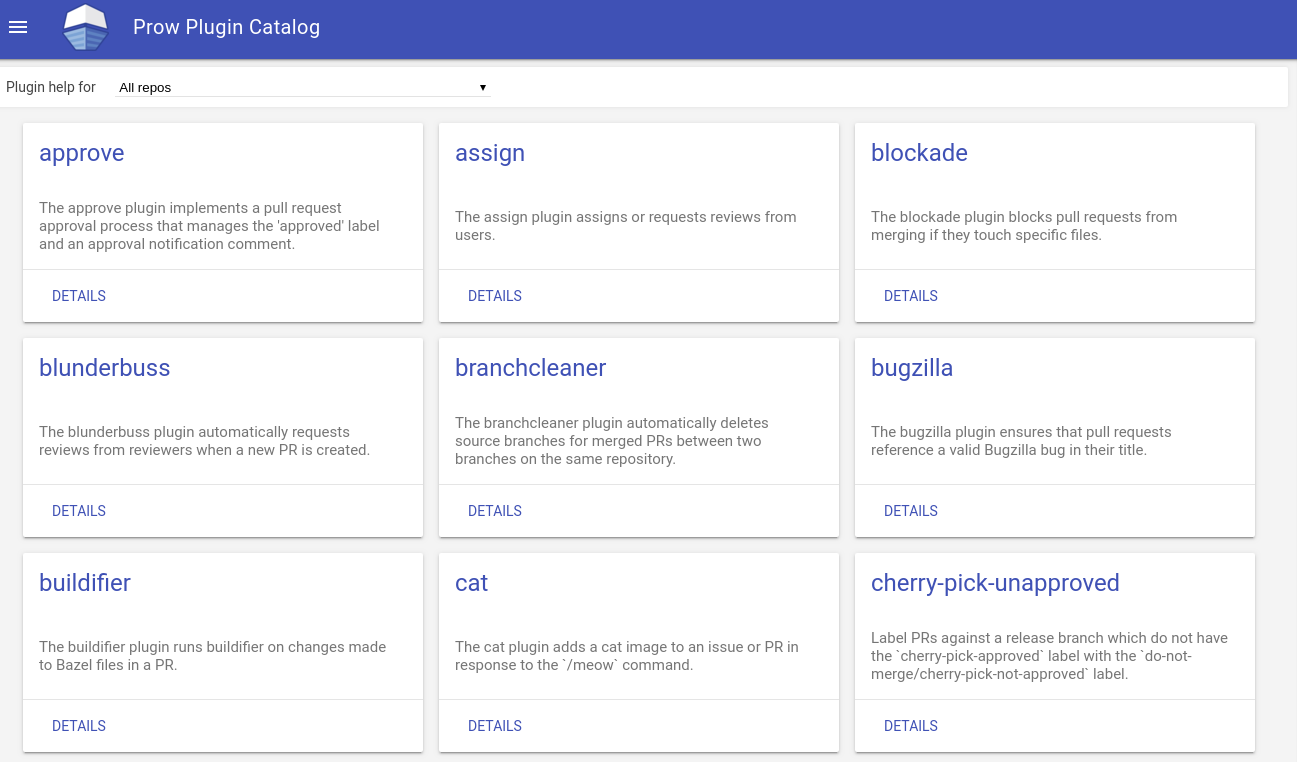
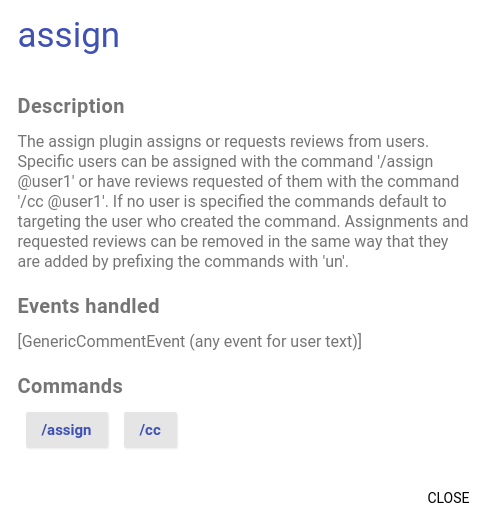
Well, Prow plugins a a bunch of resources that give you capabilities on Prow platform. As an example, assign plugin gives the functionality to assign a reviewer to a PR that is already on going.
This is how looks like part of PluginsConfig file, this one shows the enabled plugins for our organization:
plugins:
  the-shadowmen:        # Organization
  - size                # Manages the 'size/*' labels per PR
  - label               # Base plugin for labeling
  - hold                # Allows to add or remove the 'do-not-merge/hold'
  - assign              # Assigns or requests reviews from users.
  - blunderbuss         # Auto-Assign new PRs created to the reviewers.
  - lifecycle           # Close, reopen, flag and/or unflag an issue or PR as frozen/stale/rotten
  - verify-owners       # Validates OWNERS files if they are modified in a PR.
  - wip                 # Applies the 'do-not-merge/wip' Label to pull requests.

  the-shadowmen/prow-devconf:
  - trigger
As you see those plugins are enabled for all the organization and you doesn't need to add them for every repo you have. Instead some other plugins need to be enabled by repository to make them work
38
Inside of plugins: section we should add every repo and plugins that want to be managed by Prow:
  the-shadowmen/kubevirt.github.io:
  - trigger
  - owners-label
plugins: sectionlgtm: - repos: - the-shadowmen/kubevirt-tutorial - the-shadowmen/kubevirtci - the-shadowmen/prow-devconf review_acts_as_lgtm: true
Some plugins needs additional Config sections on Prow ConfigFile or maybe needs Additional services to be working properly, like lgtm, approve, or trigger. All of them has a thing in common, are managed by the same service Tide, which needs to be properly configured.
As we said before:
Also interacts with Plank in order to trigger Jobs
40
As you see, the config and the Jobs are mixed in the same ConfigMap/File, this is weird isn't it?
Well this is what you need:
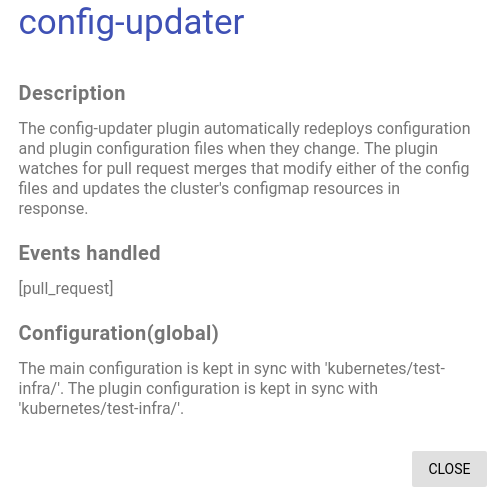
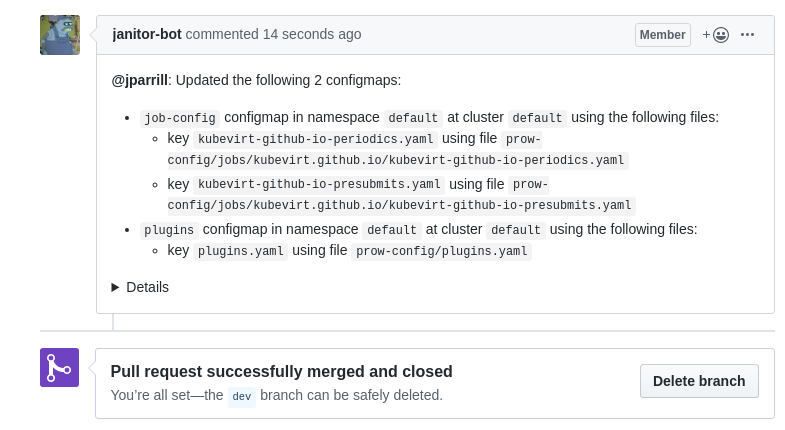
Config updater redeploys configuration and plugin configuration files when they change and allows you to keep separated your Jobs from your config.
plugins.yaml:config_updater: # Config Updater section maps: prow-config/config.yaml: # It will take the Config from this path name: config prow-config/jobs/**/*.yaml: # It will take the Jobs from this path name: job-config prow-config/plugins.yaml: # It will take the Plugins from this path name: plugins prow-config/labels.yaml: # It will take the Labels from this path name: label-config
Note: Ensure you've been validated that the config, plugins and jobs are correctly set on their files with checkconfig.
42After that you will need to add the config-updater to the repo that contains the data:
  the-shadowmen/prow-devconf:
  - trigger
  - owners-label
  - lgtm
  - approve
  - config-updater
This is the link between the repo and the config. Then the plugin will create the ConfigMaps:
NAME                     DATA   AGE
config                   1      2d2h
job-config               1      17h
label-config             1      20h
plugins                  1      2d2h
In order to let prow know that you are using a separated ConfigMap to the deployments, you need to patch the deck, hook, horologium, plank, sinker, tide and statusreconciler, with this changes:
- mountPath: /etc/job-config
  name: job-config
  readOnly: true
Owners will allow you to set reviewers and approvers by folder or setting up somefilters in your managed repositories.
To make it work you only need to enable the plugin in the repo config and after that, create a OWNERS file in the desired folder, it will have this format:
    reviewers:
      - codificat
      - jparrill
      - iranzo
    approvers:
      - iranzo
      - ptrnull
    emeritus_approvers:
      - karmab # 10 july 2019
      - tripledes # 10 july 2019
filters:
  ".*":
    reviewers:
      - codificat
      - jparrill
      - iranzo
    approvers:
      - iranzo
      - ptrnull
    emeritus_approvers:
      - karmab # 10 july 2019
      - tripledes # 10 july 2019
## This part is for owner-labels
  "^_posts/.*":
    labels:
      - kind/blog
  "^_(data|layouts|sass|css|js)/.*":
    labels:
      - kind/website
This is a real sample of filters
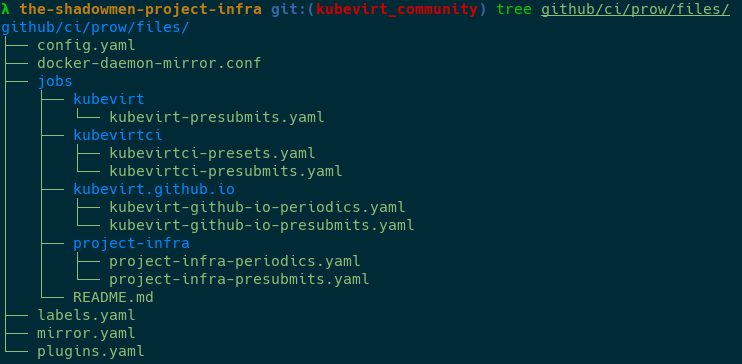
48This is a very good example about how to configure Prow Jobs among multiple work groups:
The folders have their own OWNERS file and every job file have the kind of job followed by the repo name: kubevirt-tutorial-presubmits.yaml
and the OWNERS file is like:
reviewers:
  - codificat
  - iranzo
  - ptrnull
  - jparrill
approvers:
  - jparrill
  - codificat
  - iranzo
  - ptrnull
/lgtm act as review on a PR/approve
In order to manage out repo automatically, we need to go through our Config file. You need to ensure that you've filled these sections properly
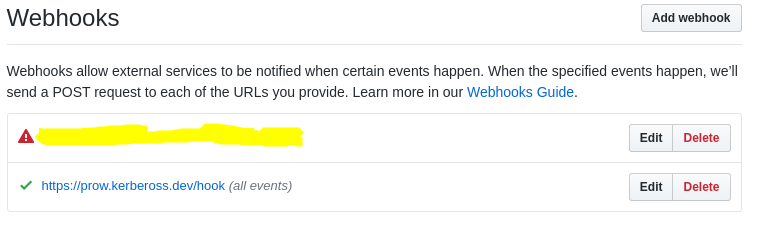
You also need to have the Github Webhook pointing properly to your Hook service on K8s on your Github Org
There is not a great way to bake the config, because the documentation is not good and you need to go through the code to know all the config statements, but you at least you have a clear workflow to follow.
checkconfig (as we saw before)
bazel run //prow/cmd/checkconfig -- \
--plugin-config=$HOME/projects/prow-devconf/prow-config/plugins.yaml \
--config-path=$HOME/projects/prow-devconf/prow-config/config.yaml \
--job-config-path=$HOME/projects/prow-devconf/prow-config/jobs
kubectl create configmap plugins --from-file=plugins.yaml=$HOME/prow_conf/plugins.yaml \
  --dry-run -o yaml | kubectl replace configmap plugins -f -

kubectl create configmap config --from-file=config.yaml=$HOME/prow_conf/config.yaml \
  --dry-run -o yaml | kubectl replace configmap config -f -

kubectl create configmap label-config --from-file=labels.yaml=$HOME/prow_conf/labels.yaml \
  --dry-run -o yaml | kubectl replace configmap label-config -f -
This will allow you to start with Prow Jobs easily.

If you'd been set the config as we followed, I've good news for you!

You should be able to execute testing right now! \o/
58The Prow jobs works in the same way as you spin up an application in K8s, just select a Base Image to work with, the EntryPoint, Volumes, Env variables, NodeSelector (in order to use concrete nodes in a kind of test).
Let's see what kind of Jobs we have and how to configure them.
Periodic:
This is how looks like the Periodic Job spec:
periodics:
  - interval: 24h
    name: kubevirt-io-periodic-link-checker
    decorate: true      # The pod will be decorated with our special config
    always_run: true    # Tests always run
    extra_refs:
    - org: the-shadowmen
      repo: kubevirt.github.io
      base_ref: master
      path_alias: kubevirt.github.io skip_report: false  # Avoid to report the Job status
    spec:
      nodeSelector:
        region: primary
      containers:
        - image: docker.io/library/ruby
          env:
            - name: NOKOGIRI_USE_SYSTEM_LIBRARIES
              value: "true"
          command: ["/bin/sh", "-c"]
          args: ["/usr/local/bin/bundle install && bundle exec rake"]
Presubmit:
or|and Tide./test or PR mergeThis is how looks like the Presubmit Job spec:
presubmits:
  the-shadowmen/kubevirt.github.io:
    - name: kubevirt-io-presubmit-link-checker
      decorate: true      # The pod will be decorated with our special config
      always_run: true    # Tests always run
      skip_report: false  # Avoid to report the Job status
      spec:
        nodeSelector:
          region: primary
        containers:
          - image: docker.io/library/ruby
            env:
              - name: NOKOGIRI_USE_SYSTEM_LIBRARIES
                value: "true"
            command: ["/bin/sh", "-c"]
            args: ["/usr/local/bin/bundle install && bundle exec rake"]
Postsubmit:
This is how looks like the Postsubmit Job spec:
postsubmits:
  the-shadowmen/kubevirt.github.io:
    - name: kubevirt-io-postsubmit-link-checker
      decorate: true      # The pod will be decorated with our special config
      always_run: true    # Tests always run
      skip_report: false  # Avoid to report the Job status
      spec:
        nodeSelector:
          region: primary
        containers:
          - image: docker.io/library/ruby
            env:
              - name: NOKOGIRI_USE_SYSTEM_LIBRARIES
                value: "true"
            command: ["/bin/sh", "-c"]
            args: ["/usr/local/bin/bundle install && bundle exec rake"]

For Presubmits and Postsubmits jobs are not necessary to have these because GitHub manage the notifications, but what happens when a Periodic job fails? who will let me know about?, well Crier is here to save the day :).
This is not a mandatory service to work, but recommendable, as we said before:
Those are the supported providers:
To Configure Crier you could follow this guide or this one, but let's summarize:
test-infra/prow/cluster/crier_rbac.yaml--slack-workers=n and --slack-token-file=/etc/slack-api-token it is on test-infra/prow/cluster/crier_deployment.yaml/etc/slack-api-token pathslack_reporter section including the desired configuration:slack_reporter: job_types_to_report: - presubmit - postsubmit - periodic - batch job_states_to_report: - triggered - pending - success - failure - aborted - error channel: team-kni-community # The template shown below is the default report_template: 'Job {{.Spec.Job}} of type {{.Spec.Type}} ended with state {{.Status.State}}. <{{.Status.URL}}|View logs>'

Introduction:
Prow Plugins:
Prow Jobs:
73Prow SSL:
Others: